

A Billie Eilish PFP gives fans a creative way to show their love for the Grammy-winning singer through a profile photo. From dark portraits and neon green hair to blonde looks, oversized outfits, and soft aesthetic edits, her changing fashion offers plenty of options for a unique avatar.
Billie Eilish, born on December 18, 2001, in Los Angeles, California, has released hit songs such as “Bad Guy,” “Ocean Eyes,” “What Was I Made For?” and “Birds of a Feather.” Her music, fashion, and striking visual style provide plenty of inspiration for fan profile pictures.
A good Billie Eilish profile picture can suit Instagram, TikTok, Discord, Pinterest, YouTube, WhatsApp, or a gaming account. The right choice depends on your preferred colors, mood, and overall online style.
Popular Billie Eilish PFP Ideas
| PFP style | Visual theme | Best platform |
|---|---|---|
| Dark Billie Eilish PFP | Black shades, dramatic lighting, moody expressions | Discord, Instagram |
| Neon Green PFP | Black outfits with bright green accents | TikTok, gaming profiles |
| Blonde Billie PFP | Light hair, elegant outfits, soft backgrounds | Pinterest, Instagram |
| Cute Billie PFP | Cartoon edits, stickers, playful expressions | WhatsApp, Discord |
| Aesthetic Billie PFP | Blue tones, soft filters, dreamy effects | Tumblr, Pinterest |
| Black and White PFP | Monochrome portraits and strong contrast | X, Instagram |
| Concert Billie PFP | Stage lighting and performance poses | YouTube, TikTok |
| Minimalist Billie PFP | Simple backgrounds and close-up portraits | Professional fan accounts |
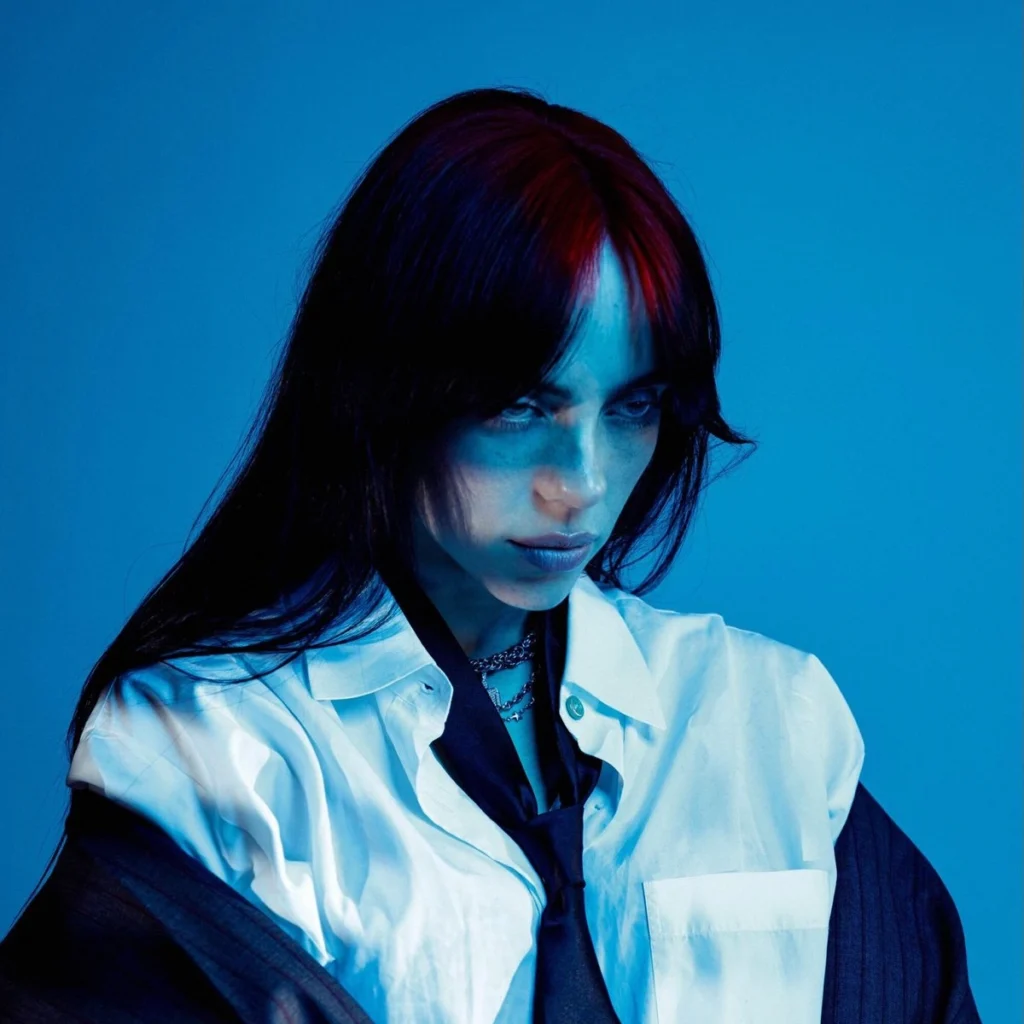
1. Dark Billie Eilish PFP
A dark Billie Eilish PFP suits fans who prefer alternative fashion, mysterious moods, and bold profile designs. Black clothing, low lighting, smoky effects, and deep shadows give this style a striking appearance.
Popular design details:
- Black and charcoal backgrounds
- Soft shadows around the face
- Silver accessories and dark makeup
- Blue or purple lighting
- Cropped close-up portraits
This style works especially well for Discord accounts, Instagram pages, and alternative music fan profiles.
2. Neon Green Billie Eilish PFP
Billie’s black-and-neon-green hairstyle from her earlier career remains a memorable source of inspiration for fan edits. Her green roots paired with dark hair created a recognizable visual combination that suits bold avatars.
Try these design ideas:
- A black background with neon green borders
- Green light effects around a portrait
- Dark clothing paired with bright accents
- Glitch effects for gaming avatars
- Green hearts, stars, or music symbols
For the best result, keep the face near the center of the image. A bright green outline can also help the photo remain visible against dark app interfaces.
3. Blonde Billie Eilish PFP
Billie’s platinum-blonde hairstyle from 2021 offers a completely different look from her darker visual eras. This style works well for fans who prefer a clean, elegant, or soft aesthetic.
Ideas for a blonde Billie Eilish avatar:
- Cream or pale pink backgrounds
- Bright portrait lighting
- Minimal makeup effects
- White borders and subtle glitter
- Close-up photos with a simple crop
A blonde Billie Eilish PFP can suit Instagram, Pinterest, and WhatsApp profiles, particularly with a light or pastel color scheme.
4. Cute Billie Eilish PFP
Cute Billie Eilish PFP designs give a fan account a cheerful, playful appearance. Small stickers, pastel colors, hearts, and cartoon effects can create a softer look without losing the music-inspired theme.
Popular choices:
- Pink hearts around a portrait
- Small star stickers
- Pastel blue and lavender backgrounds
- Chibi-inspired fan illustrations
- Smiling expressions and playful filters
For a cartoon version, choose original fan art or artwork shared with permission. This gives your account a more personal appearance than a standard celebrity photo.
5. Aesthetic Billie Eilish PFP
An aesthetic Billie Eilish PFP focuses on color, mood, and composition. Soft blue filters, film grain, blurred backgrounds, and gentle lighting can create an artistic profile image.
Try combining these elements:
- Muted blue and gray tones
- Soft-focus effects
- Small stars or moon graphics
- Film-style grain
- A simple background with plenty of open space
This style works well for Pinterest boards, Tumblr pages, and music-themed Instagram accounts.
6. Black and White Billie Eilish PFP
Black-and-white portraits offer a timeless option for fans who prefer simple, high-contrast images. Removing color places more emphasis on facial expressions, shadows, and composition.
For a polished result, look for a portrait with:
- Clear facial details
- Balanced contrast
- A plain or softly blurred background
- Good lighting around the eyes
- Enough space for a circular crop
A monochrome Billie Eilish PFP can suit almost any social platform because its simple design remains easy to view at a small size.
7. Concert Billie Eilish PFP
Concert photos capture the energy of live performances through stage lights, dramatic poses, and colorful backgrounds. They offer a strong option for fans who want their profile image to focus on music.
Look for concert images with a clear view of Billie and a background that does not overpower her face. Blue, red, purple, and green lighting can all work well, depending on the mood you want.
8. Minimalist Billie Eilish PFP
Minimalist profile photos use a single portrait, a plain background, and little or no decoration. This approach suits fans who want a neat avatar without extra graphics.
A minimalist design may feature:
- A close-up portrait
- A solid black or white background
- One small decorative symbol
- A thin circular border
- Natural colors and gentle contrast
Avoid placing text across the face. At small display sizes, words and tiny decorations can become difficult to read.
Billie Eilish PFP Ideas by Platform
Different platforms crop and display profile pictures in different ways. The table below offers a practical starting point for selecting a suitable design.
| Platform | Suggested PFP | Recommended approach |
|---|---|---|
| Aesthetic or blonde portrait | Use a centered face and balanced colors | |
| TikTok | Neon green or concert photo | Choose a bold image that reads at small sizes |
| Discord | Dark or gaming-style edit | Try dark tones and a bright accent |
| Cute or minimalist portrait | Keep the photo clear and uncluttered | |
| YouTube | Concert or close-up portrait | Choose a recognizable image |
| Soft aesthetic or blonde portrait | Match the image to your board theme | |
| X | Black-and-white portrait | Use strong contrast and a simple crop |
Billie Eilish PFP Color Combinations
Color plays a major role in the final appearance of a profile photo. A well-matched palette can make an avatar feel more cohesive.
| Color palette | Overall mood | Suggested details |
|---|---|---|
| Black and neon green | Bold, alternative | Green borders, dark shadows |
| Blue and silver | Cool, dreamy | Soft glow, silver stars |
| Pink and white | Cute, gentle | Hearts, pastel filters |
| Black and purple | Mysterious | Purple lighting, dark backgrounds |
| Cream and beige | Soft, elegant | Minimal borders, warm lighting |
| Red and black | Dramatic | Red highlights, strong contrast |
| Gray and white | Clean, timeless | Monochrome filters |
How to Choose a High-Quality Billie Eilish PFP
The best Billie Eilish PFP should look clear on a phone screen and remain recognizable inside a small circular frame.
Use this checklist before saving an image:
-
The face or main subject appears near the center.
-
The photo has enough resolution for a sharp display.
-
The background does not overpower the subject.
-
The colors match your profile theme.
-
The crop leaves room around the head and shoulders.
-
The image comes from a source that permits your intended use.
Recommended image settings
| Setting | Practical recommendation |
|---|---|
| Shape | Square, 1:1 |
| Resolution | 512 × 512 pixels or higher |
| File format | PNG or JPEG |
| Subject placement | Centered |
| Background | Simple or softly blurred |
| Text | Minimal or none |
A larger source image gives you more room to crop without losing detail. Check the target platform’s current upload limits before exporting.
Where to Find Billie Eilish Profile Pictures
Several sources can help you find suitable images for a Billie Eilish fan profile.
- Official social accounts: Visit Billie Eilish’s official social profiles for authentic photos and updates.
- Pinterest: Search for Billie Eilish aesthetic PFP, blonde Billie PFP, or neon green Billie Eilish avatar.
- Fan art communities: Look for original illustrations and check the artist’s usage terms.
- Photo-editing apps: Use cropping, brightness adjustments, and color filters to personalize an image you have permission to edit.
- Personal edits: Combine a suitable portrait with your preferred background, border, or color palette.
Avoid assuming that a publicly visible image is free for commercial reuse. Credit artists and follow the relevant permissions, particularly for fan art.
How to Make Your Own Billie Eilish PFP
Creating a personalized profile picture takes only a few simple steps.
- Select a portrait. Pick a photo that matches your preferred Billie Eilish era or aesthetic.
- Crop the image. Use a square canvas and place the face near the center.
- Adjust the colors. Apply a neon green, blue, monochrome, or pastel treatment.
- Add small details. A border, star, or subtle glow can improve the design.
- Check the thumbnail. Reduce the image size to see how it looks in a social feed.
- Export the file. Save a sharp square image in PNG or JPEG format.
Keep the editing simple. Too many stickers, filters, and text elements can make a small profile photo appear crowded.
Billie Eilish PFP Trends and Fan Aesthetics
Billie’s visual identity has changed across different periods of her career. Her earlier neon-green roots, platinum-blonde hair, dark looks, and softer styling offer several distinct directions for fan avatars. Her different hairstyles and fashion choices give fans plenty of visual options.
Popular themes for fan profile pictures include:
- Retro-inspired: Film grain, muted colors, and vintage-style cropping.
- Alternative: Dark clothing, black backgrounds, and strong contrast.
- Soft aesthetic: Pastel colors, gentle lighting, and subtle effects.
- Music-focused: Concert shots, microphones, and stage lighting.
- Fan-art style: Original illustrations, cartoon avatars, and custom graphics.
There is no single style that every fan needs to follow. Choose an image that fits your personal taste and the kind of account you want to create.
Final Thoughts
A Billie Eilish PFP offers plenty of creative possibilities, from neon-green alternative edits to elegant blonde portraits, monochrome photos, and cute fan illustrations. Choose a clear image, match its colors to your preferred aesthetic, and keep the composition simple enough to work as a small avatar.
What does Billie Eilish PFP mean?
Billie Eilish PFP refers to a profile picture featuring the American singer Billie Eilish. Fans use these images on social media, messaging apps, gaming accounts, and fan pages.
Which Billie Eilish PFP style is most popular?
Dark portraits, neon-green edits, aesthetic close-ups, blonde looks, and concert photos are common choices among fans. Personal preferences and current trends vary across platforms.
Can I use a Billie Eilish PFP on Discord?
Yes. You can upload a suitable image to your Discord profile, subject to the platform’s current image rules. A centered portrait with good contrast works well at small sizes.
How do I make a Billie Eilish PFP look better?
Start with a sharp image, crop it to a square, center the subject, and use a restrained color filter. Preview the image at thumbnail size before uploading it.
Can I use Billie Eilish fan art as my profile photo?
You can use fan art according to the artist’s permissions and any applicable platform rules. Public availability alone does not grant permission for every use.
Where can I find official Billie Eilish photos?
Visit her official website or verified social media accounts. Fan pages and image-sharing sites may also have edits, but their images may not be official.
